››
Instagram Image Sizes in 2026: The Only Cheat Sheet You'll Need
Upload a photo to Instagram and it either looks crisp and intentional, or it looks like Instagram mangled it. There's no in-between, and the difference almost always comes down to one thing: whether you used the right pixel dimensions before you hit post. Instagram doesn't ask permission before…
⚡ Key Takeaways
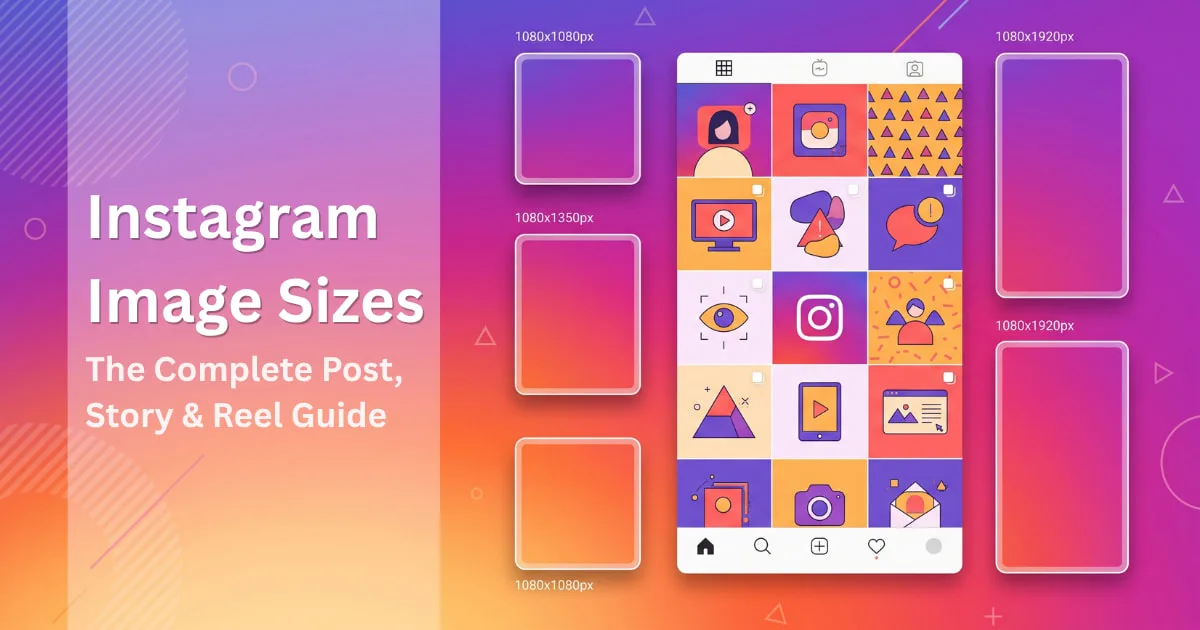
- The default Instagram feed post size in 2026 is 1080 x 1350px (4:5 portrait aspect ratio).
- Instagram Stories and Reels both use 1080 x 1920px at a 9:16 aspect ratio.
- Instagram's profile grid now previews thumbnails at a 3:4 ratio instead of a square, so square (1:1) posts appear slightly cropped on the sides.
- The grid-optimized size that displays with zero cropping is 1080 x 1440px (3:4).
- Instagram's standard profile picture size is 320 x 320px, displayed as a circle.
- Carousel posts should use one consistent ratio across every slide — 1080 x 1350px (4:5) is recommended — since Instagram force-crops mismatched slides.
- Any upload under 1080 pixels wide gets upscaled by Instagram and looks noticeably softer.
Upload a photo to Instagram and it either looks crisp and intentional, or it looks like Instagram mangled it. There's no in-between, and the difference almost always comes down to one thing: whether you used the right pixel dimensions before you hit post.
Instagram doesn't ask permission before it resizes your images. If your file doesn't match its preferred dimensions, the app crops it, compresses it, or both — and you don't get a preview of the damage until it's already live.
This guide lays out every current Instagram image size for 2026: feed posts, carousels, Stories, Reels, profile pictures, Highlight covers, and ads. We'll also cover the biggest shift in how Instagram displays your grid, which changes what "correct size" even means this year.
Instagram Image Sizes at a Glance (2026)
Bookmark this table. It covers 90% of what you'll ever need to look up.
Format | Recommended Size | Aspect Ratio |
|---|---|---|
Square feed post | 1080 x 1080 px | 1:1 |
Portrait feed post | 1080 x 1350 px | 4:5 |
Grid-optimized portrait | 1080 x 1440 px | 3:4 |
Landscape feed post | 1080 x 566 px | 1.91:1 |
Carousel post | 1080 x 1350 px | 4:5 |
Profile picture | 320 x 320 px | 1:1 |
Highlight cover | 1080 x 1920 px | 9:16 |
Stories | 1080 x 1920 px | 9:16 |
Reels | 1080 x 1920 px | 9:16 |
Reel cover / thumbnail | 1080 x 1080 px | 1:1 |
Feed ad | 1080 x 1080 or 1080 x 1350 px | 1:1 or 4:5 |
Story ad | 1080 x 1920 px | 9:16 |
Keep every upload at least 1080 pixels on the long edge. Anything smaller gets upscaled and turns soft; anything much larger just gets compressed back down anyway, so 1080px is the sweet spot.
What Actually Changed on Instagram This Year
For most of Instagram's history, your profile grid showed a perfect square preview, even if you posted a taller 4:5 image — Instagram just cropped the top and bottom off for the thumbnail. That's no longer true.
Instagram now previews grid thumbnails at a taller 3:4 ratio instead of a square. Adam Mosseri confirmed the shift was driven by how people actually shoot content today: most uploads are vertical photos or 9:16 video, and forcing that into a square crop was cutting off the parts people cared about most. You can confirm current grid behavior anytime in Instagram's own Help Center.
Practically, this means:
Square (1:1) posts now get slightly cropped on the sides in the grid preview, even though the full image still shows in-feed when someone taps in.
A 1080 x 1440px image (3:4) fills the grid thumbnail edge-to-edge with no cropping at all.
The old advice to "just post everything square for a clean grid" is outdated. A consistent 4:5 or 3:4 portrait feed now looks cleaner than an all-square one.
If you only change one habit after reading this: default to portrait (4:5 or 3:4) for feed posts unless the content specifically calls for square or wide.
Feed Post Sizes, Format by Format
Square posts — 1080 x 1080px (1:1)
Still a safe, familiar choice for product shots, quotes, and flat-lay content. Just know it'll show up slightly cropped at the sides in the new grid preview — center your subject so nothing important sits near the edges.
Portrait posts — 1080 x 1350px (4:5)
This is the default Instagram recommends for feed content, and for good reason: a taller image takes up more vertical space as someone scrolls, which means more time in front of their eyes before they swipe past. If you post one type of image most often, make it this one.
Grid-optimized portrait — 1080 x 1440px (3:4)
This is the size built specifically for the new grid preview. It renders with zero cropping in your profile thumbnail. If a polished, uncropped grid matters to your brand (agencies, boutiques, portfolio accounts), design your covers at this ratio.
Landscape posts — 1080 x 566px (1.91:1)
Best reserved for panoramas, before/after comparisons, or screenshots that are naturally wide. It takes up the least vertical space in the feed, so it's the format most likely to get scrolled past quickly — use it deliberately, not by default.
Carousel Post Size
Ideal size: 1080 x 1350px (4:5)
Carousels work best when every slide shares one consistent ratio — Instagram will force mismatched slides into whatever ratio the first image uses, and it won't let you fix that crop later. Pick 4:5, apply it to the whole set, and you avoid the awkward auto-crop entirely. If you're building carousels for a step-by-step guide or a "swipe for more" series, this consistency also just looks more professional.
Instagram Stories Size
Ideal size: 1080 x 1920px (9:16)
Acceptable fallback sizes if your source file is lower resolution:
900 x 1600px
720 x 1280px
Both fallbacks are fine as long as you keep the 9:16 ratio — what actually hurts quality is stretching a non-matching ratio to fit, not a slightly lower pixel count.
A few Story-specific limits worth knowing: images must stay under 30MB and upload as JPG or PNG; videos max out at 4GB and 60 seconds per segment, in MOV or MP4. And because Instagram's UI overlays sit at the top and bottom of the screen (profile info up top, reply bar at the bottom), keep any text or faces centered in the middle third of the frame.
Instagram Reels Size
Ideal size: 1080 x 1920px (9:16) Reel cover/thumbnail: 1080 x 1080px (1:1)
Reels play full-screen at 9:16, but the moment someone shares a Reel to their feed or it shows up in someone's grid, Instagram re-crops it — 4:5 in-feed, 1:1 in the grid. That means anything critical (a face, a product, on-screen text) needs to sit in the center of the frame, not near the top or bottom, or it'll get clipped depending on where the Reel is being viewed.
Length-wise, Reels recorded and edited in-app can run up to 3 minutes. Reels uploaded from outside the native camera can run longer, but anything over 3 minutes won't surface in the main Reels feed — it'll just sit as a regular video post.
Profile Picture Size
Ideal size: 320 x 320px (1:1)
Your profile photo displays as a circle roughly 110px across in the feed, but Instagram stores and serves it at 320 x 320px for sharper rendering on high-density screens. Since it renders in a circle, keep your logo, face, or icon centered with breathing room — anything close to the corners gets clipped by the circular mask.
Highlight Cover Size
Ideal size: 1080 x 1920px (9:16), cropped into a circle on display
Highlights covers also render inside a circular frame, so the same centering rule applies. Most brands keep these minimal — a single icon or a couple of words — since fine detail and small text don't survive the circular crop well.
Instagram Ad Sizes
Ad type | Size | Ratio |
|---|---|---|
Feed ad (square) | 1080 x 1080px | 1:1 |
Feed ad (portrait) | 1080 x 1350px | 4:5 |
Story ad | 1080 x 1920px | 9:16 |
Feed ads work best in square or portrait since both take up more visible screen space than landscape, which matters when you're paying per impression. Story ads should be designed full-screen from the start rather than repurposed from a feed image — repurposed Story ads are one of the most common reasons ad creative gets flagged for "low quality" in Ads Manager. Meta keeps its full, current spec sheet on the Meta Business Help Center if you want to double-check before a big campaign launch.
Video Specs Across Formats
Placement | Ratio | Max length | Max file size |
|---|---|---|---|
Feed / Carousel video | 1:1, 4:5, or 1.91:1 | Up to 60 min (15 min via mobile) | 4GB |
Reels | 9:16 | 3 min in-app | 4GB |
Stories | 9:16 | 60 sec (split into 15-sec segments) | 4GB |
Live replay | 9:16 | Up to 4 hours | 4GB |
Across every format, aim for MP4 or MOV, H.264 codec, and at least 30fps. Anything below 30fps tends to look choppy on modern phone screens, even if the resolution itself is correct.
How to Pick the Right Size Without Overthinking It
Match the ratio to the content, not the trend. A wide landscape shot squeezed into a square just loses detail. Shoot or crop for the ratio you're actually going to publish in.
Default to portrait for reach. 4:5 and 3:4 consistently take up more feed real estate than square or landscape, and more real estate usually means more time in front of the viewer.
Center anything important. Faces, logos, and text should sit in the middle third of the frame across Stories, Reels, profile photos, and Highlight covers — every one of these gets cropped or masked in some context.
Keep one ratio per carousel. Mixed ratios inside a single carousel get force-cropped by Instagram with no way to adjust it afterward.
Stay consistent across your grid. Since the grid now previews at 3:4, jumping between square, 4:5, and landscape posts creates a visibly uneven profile. Pick one or two formats and stick with them.
Common Sizing Mistakes That Quietly Hurt Engagement
Uploading anything under 1080px wide. Instagram upscales it, and the result looks soft compared to posts around it.
Posting square content and expecting a clean grid. In 2026, square posts get side-cropped in the grid preview — switch to 3:4 if a tight, uncropped grid matters to you.
Designing Story text edge-to-edge. The top and bottom of the frame are covered by Instagram's own UI elements; anything placed there gets hidden behind them.
Recycling a feed image as a Story ad. The ratio mismatch is obvious to viewers and often flagged during ad review.
Ignoring carousel consistency. One landscape slide in an otherwise square carousel forces an ugly, uneven crop across the whole set.
Resizing and Scheduling Without the Guesswork
Getting the dimensions right is only half the job — the other half is not having to redo this checklist every time you post. If you're managing Instagram alongside LinkedIn, Facebook, or Threads, a scheduler that previews your post in the correct crop before it goes live saves you from finding out about a bad crop after followers already have.
Treplino does exactly that: it shows you how a post, carousel, or Reel cover will actually render before publishing, and its AI Writer and carousel tools default to the current recommended dimensions automatically, so you're not manually checking a size chart before every upload.
✨ Boost Your Reach
Schedule & Auto-Publish Social Media in Minutes
Join thousands of creators & brands using Treplino to generate high-performing posts and automate daily social growth.
Start Free TrialNo credit card required
A
Written By
Asad
Social Media Strategist & AI Specialist
Asad writes on social media automation, content marketing algorithms, and AI growth strategies for modern creators and marketing teams.
Frequently Asked Questions
Both use 1080 x 1920px at a 9:16 aspect ratio, Instagram's full-screen vertical format.
Keep Reading
Related Articles
Try Treplino Today
Supercharge Your Content Publishing & Social Strategy
AI writing tools, calendar planning, WordPress auto-sync, and automated scheduling across LinkedIn, Facebook, and Threads.
Start Your Free Trial